The error says "line 11, column 5" but line 11 looks fine. Sound familiar?
Ansible error messages can be cryptic. A missing space breaks everything. A typo in a variable name fails silently until three tasks later. YAML indentation errors point to the wrong line.
This guide gives you a systematic approach to diagnosing and fixing the most common Ansible playbook errors.
What you'll learn:
- How to read Ansible error messages (they're more helpful than they look)
- The 5 most common error types and how to fix each one
- Using the debug module effectively
- How Ascender Pro makes debugging dramatically easier
Series: Ansible development best practices
- Part A: Achieving idempotency
- Part B: Debugging and troubleshooting (you are here)
- Part C: Mastering nested loops (coming soon)
- Part D: Enterprise features (coming soon)
The debugging workflow
When a playbook fails, follow this sequence:
- Read the error message: Line number, column, and error type
- Check syntax first: YAML formatting causes most failures
- Verify variable names: Typos won't error until runtime
- Test incrementally: Comment out sections to isolate problems
- Use debug tasks: Print variables to understand state
Error type 1: YAML syntax errors
Error message:
Unable to read either as JSON nor YAML
Line 1, column 1
Common causes:
- Wrong number of dashes at start (must be exactly three:
---) - Tab characters instead of spaces
- Missing colon after key names
Fix:
# WRONG - four dashes
----
- name: My playbook

# CORRECT - three dashes
---
- name: My playbook
Pro tip: Configure your editor to show whitespace characters and convert tabs to spaces.
Error type 2: Indentation errors
Error message:
did not find expected key
Line 11, column 5
Common causes:
- Inconsistent indentation levels
- Mixing tabs and spaces
- Tasks not aligned under
tasks:
Why does the error point to the wrong line?
YAML parsers report where they detected the problem, not where it occurred. When indentation breaks, the parser often doesn't realize it until 1-3 lines later when it encounters something that doesn't fit the broken structure.
Debugging tip: If the error says "line 11" but line 11 looks fine, check lines 8-10 for:
- Inconsistent indentation
- Missing colons
- Tasks not properly nested under `tasks:`
This is why the error message says "line 11, column 5" even though line 11 is perfectly valid YAML.
Fix:
# WRONG - debug not indented under task
 tasks:
 - name: Display variable
 ansible.builtin.debug:
   var: my_variable

 # CORRECT - consistent 2-space indentation
 tasks:
  - name: Display variable
    ansible.builtin.debug:
      var: my_variable
VS Code shortcut: Select lines and press Ctrl + ] to indent right, Ctrl + [ to indent left.
Pro tip: Use a YAML syntax linter such as yamllint to catch syntax errors
Error type 3: Module name typos
Error message:
ERROR! no action detected in task. This often indicates a misspelled module nameCommon causes:
- Misspelled module names
- Wrong FQCN (Fully Qualified Collection Name)
Fix:
# WRONG - typo in module name
- name: Display message
  ansible.builtin.degub:  # "degub" instead of "debug"
    msg: "Hello"

# CORRECT
- name: Display message
  ansible.builtin.debug:
    msg: "Hello"
Pro tip: Modern Ansible requires Fully Qualified Class Name (FQCN) for clarity. Always use `ansible.builtin.debug` not just `debug`.
Error type 4: Host pattern mismatches
Error message:
Could not match supplied host pattern, ignoring: webserversCommon causes:
- Host/group doesn't exist in inventory
- Host is disabled
- Typo in hostname or group name
Fix: Verify the host exists and is enabled in your inventory. In Ascender Pro, go to Inventories → [Your Inventory] → Hosts and search.
# Fragile - typo breaks everything
- hosts: server_123.example.com

# Resilient - group membership managed separately
- hosts: webservers
Error type 5: Undefined variables
Error message:
The task includes an option with an undefined variableCommon causes:
- Variable not registered before use
- Typo in variable name
- Variable out of scope (defined in different play)
Fix: Use debug to inspect available variables:
- name: Show all variables
  ansible.builtin.debug:
    var: vars

- name: Show specific variable
  ansible.builtin.debug:
    var: my_variable

- name: Show with context
  ansible.builtin.debug:
    msg: "The value is {{ my_variable | default('NOT DEFINED') }}"
The | default('NOT DEFINED') filter prevents the error and shows you what's missing.
Debug without the guesswork
Ascender Pro captures complete JSON output for every task. Click any task to see all variables, return values, and host metadata — no debug tasks required.
Ascender Pro advantage: Visual debugging
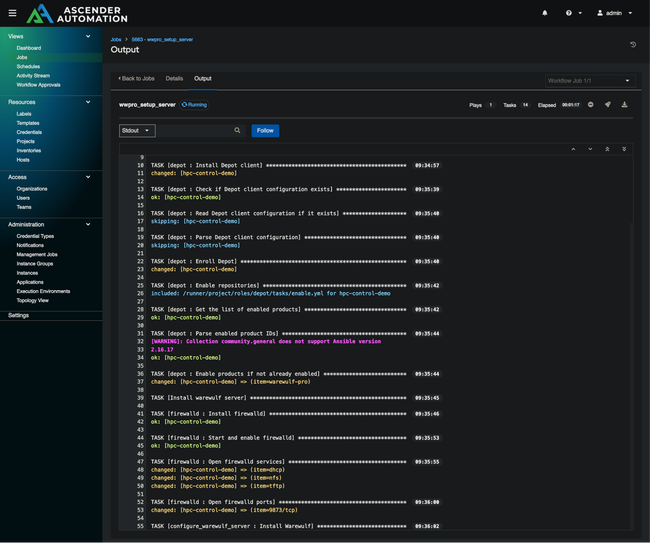
Command-line debugging means adding debug tasks, running the playbook, reading scroll-back, editing, and repeating. Ascender Pro changes this:
| Debugging task | CLI Ansible | Ascender Pro |
|---|---|---|
| See variable values | Add debug task, rerun | View actual JSON |
| Find where it failed | Scroll through output | Color-coded, click to expand |
| Compare to last successful run | Hope you saved the output | Side-by-side job comparison |
| Share failure with teammate | Copy/paste terminal | Send job URL |
"Update revision on launch" is especially valuable for debugging:
- Edit playbook in your IDE
- Commit to Git
- Click "Launch" in Ascender Pro (auto-syncs repo)
- View results immediately
No manual sync step. No "forgot to pull latest" issues.
Using the debug module effectively
var vs msg
# var: Shows variable name and structure
- name: Display with var
  ansible.builtin.debug:
    var: users.stdout_lines
# Output: "users.stdout_lines": ["root", "admin", "deploy"]

# msg: Shows just the value with custom text
- name: Display with msg
  ansible.builtin.debug:
    msg: "Found {{ users.stdout_lines | length }} users"
# Output: "msg": "Found 3 users"
Conditional debugging
Only show debug output when running with increased verbosity:
- name: Verbose-only debug info
  ansible.builtin.debug:
    msg: "Detailed info: {{ complex_variable }}"
  when: ansible_verbosity >= 2
Debugging registered variables
When a registered variable doesn't contain what you expect:
- name: Run command
  ansible.builtin.shell: cat /etc/passwd
  register: passwd_output

- name: See what we got
  ansible.builtin.debug:
    var: passwd_output

# Shows: stdout, stdout_lines, stderr, rc, changed, etc.
This reveals the full structure so you know whether to use .stdout, .stdout_lines, or something else.
Quick reference: Error types
| Error message | Likely cause | First thing to check |
|---|---|---|
| "Unable to read as JSON nor YAML" | YAML syntax | Dash count, tabs vs. spaces |
| "did not find expected key" | Indentation | Alignment under parent |
| "conflicting action statements" | Module typo | Spelling of module name |
| "Could not match host pattern" | Inventory issue | Host exists and enabled |
| "undefined variable" | Variable scope/typo | Variable name spelling, registration order |
| "Permission denied" | Credentials | SSH key, become password |
| "unreachable" | Connectivity | Network, SSH, host online |
Pre-flight troubleshooting checklist
Before asking for help, verify:
- Playbook has correct YAML syntax (three dashes, spaces not tabs)
- All module names are spelled correctly
- Variables are defined before use
- Host patterns match inventory entries
- Hosts are enabled in inventory
- Changes are committed to Git AND pushed to remote
- Project is synced (or "Update on launch" is enabled)
- You've checked the JSON output for variable structure
- You've compared to a previous successful run
Next steps
Playbook working but running slowly?
Continue with Part C: Mastering nested loops (coming soon) to learn efficient iteration patterns.
Want visual debugging and 90-day job history?
Try Ascender Pro to see how enterprise features transform your debugging workflow.